
User manual





25
2.5. Checking for Proper Installation
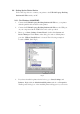
Please click on Start, Settings, Control Panel, double-click System, and Device
Manager. Please double check “Human Interface Devices”, “Keyboard”,
“Mouse”, “Network adapters”, “Ports”, and “Universal serial bus controller”
on the dialog box and see if they are working properly.