Owner's Manual
Manuals
Brands
LG Manuals
NAS & storage servers
N4B1N
11
12
13
14
15
16
17
18
19
20
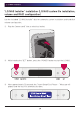
. LG NAS Installation
1
①
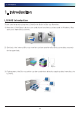
First, ensure that the power is off for all components and the main system.
②
Open the LG NAS front cover.
③
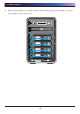
Unlock the hard disk rack and pull the lever to draw out the rack.
1
...
...
14
15
16
17
18
...
...
157