
Owner's Manual




Custom-designed Features 16
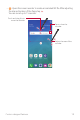
• : Opens the magnifying window.
Tap to change the
colour contrast.
Tap to change the size
of the magnifying
window.
Tap to close the
magnifying window.
Touch and drag this to
move the magnifying
window.
• : Add a shortcut to an app of your choice. Touch and hold the newly added
app to change the shortcut to another app.
Camera features
Flash Jump-Cut
Create a GIF by taking photos 3 seconds aparts.
1
Tap , then tap MODE .
2
Tap to take a photo.
• : Set how many photos you want to take to create a GIF. Photos
amount to take automatically.
3
Photos are taken every 3 seconds and saved as a GIF file.