
Owner's Manual




62
Emergency Agent Program
If you set the notification in the emergency option to
ON, the system sends a message according to the
settings of the notification options in the setup menu.
(See page 35-36).
1. Double-click the [LG Emergency Agent] icon to
start the emergency agent program.
The Emergency icon is displayed in the system
tray on the bottom right of the screen.
2. Whenever a notification function occurs, a mes-
sage box is displayed on the bottom right of the
screen.
The message box is displayed for 5 seconds.
3. Check the message.
4. Click the message box within 5 seconds to dis-
play the [Received Messages] window.
or
Right click the mouse on the program icon in the
system tray and select the [Check Message Box]
option to display the [Received Messages] win-
dow.
5.
You can check all the subjects of received
messages.
6.
Click the [CLOSE] button to close the [Received
Messages] window.
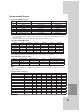
Main Screen of Emergency
Agent
a b c
d e f g h i
a Displays message type.
b Displays IP Address.
c Displays received time.
d Displays the port change window.
e Displays the search window.
f Refreshes the received message on the list.
g Detailed view of the received message.
h Deletes the selected message from the list.
i Closes the [Received Messages] window.
ADDITIONAL PROGRAMS