
Owner's Manual





Connections and settings 33
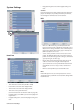
When you want to change DDNS host name
If you want to change the registered host name to new one,
follow as shown below.
1.
Enter a new host name in [Host Name] option.
2. Select the [Update] icon and press ENTER.
The confirmation window will be displayed to change
your host name.
3. Select the [OK] and press ENTER.
When host name is properly changed, the changed host
name will be displayed in [Registered Host].
Note:
If host name is not changed after updating, please check
network connection.
Notication
Sensor On:
ON: Sends an e-mail when a sensor has occurred.
OFF: Not used.
Motion Detection:
ON: Sends an e-mail when an motion detection has
occurred.
OFF: Not used.
Disk Full:
ON: Sends an e-mail when the HDD has fully record-
ed.
OFF: Not used.
Admin PWD. Changed:
ON: Sends an e-mail when the administrator pass-
word has changed.
OFF: Not used.
Video Loss:
ON: Sends an e-mail when a video signal from the
camera has stopped because of a cable disconnec-
tion or malfunction of a camera.
OFF: Not used.
Power On/Off:
ON: Sends an e-mail when power is on.
OFF: Not used.
•
-
-
•
-
-
•
-
-
•
-
-
•
-
-
•
-
-