
Owner's Manual





Connections and settings 31
5. Click the right mouse button to exit the settings.
6. Select [Exit] and press ENTER to exit the sub-setup
menu.
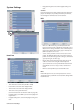
Output
Relay Off
ALARM ACK.: Use the ALM.OFF button to stop
alarm.
POST-ALARM TIME: The alarm is stopped after post-
alarm time.
System Alarm Out:
ON: Outputs the alarm (relay) signal via the
ALARM-OUT terminal below cases.
When the HDD has bad sector.
When a video signal from the camera has
stopped because of a cable disconnection or
malfunction of a camera.
OFF: Not used.
•
-
-
•
-
>
>
-
Network Settings
TCP/IP
DHCP: DHCP stands for Dynamic Host Configuration
Protocol.
ON: Network settings of this unit are configured
automatically by the DHCP server. You can use the
DDNS function instead of the dynamic IP address.
(For more details refer to the DDNS settings).
If you set to ON, the [IP Address], [Subnet Mask],
[Gateway], [Primary DNS] and [Secondary DNS]
options are not set.
OFF: Enter the network settings manually.
•
-
-