
Owner's Manual






Connections and settings 29
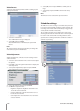
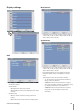
Display settings
OSD
Language: Select a language for the setup menu and
information display.
Channel Name
ON: Displays the title of the channel.
OFF: Displays the live picture without the title of the
channel.
Channel Status
ON: The current channel recording status is dis-
played.
OFF: Remove the current channel recording status.
•
•
-
-
•
-
-
Main Monitor
Dwell Time: You can set the channel sequence time to
2 SEC, 5 SEC, 10 SEC, 20 SEC, 30 SEC, 40 SEC, 50 SEC, 60
SEC, 70 SEC, 80 SEC or 90 SEC.
Spot Monitor
Dwell Time: You can set the channel sequence time to
2 SEC, 5 SEC, 10 SEC, 20 SEC, 30 SEC, 40 SEC, 50 SEC, 60
SEC, 70 SEC, 80 SEC or 90 SEC.
Event Popup: Displays an event popup on the spot
monitor if motion, sensor or all (motion or sensor)
occur.
Spot Channel: Selects the desired spot channel.
-
01~04: Views the selected channel’s surveillance
image on the spot monitor.
-
SEQUENCE 1: Views the all channels in sequence.
The covert channel(s) or video loss channel(s) is(are)
not displayed with power and normal user.
-
SEQUENCE 2: Views the all channels in sequence
except the covert channel(s) and video loss
channel(s).
•
•
•
•