
Multi F High-Static Ducted Installation Manual

22
OPTIONAL OPERATION
ENGLISH
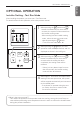
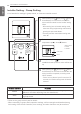
Installer Setting - Setting Address of Central Control
It's the function to use for connecting central control.
Please refer to central controller manual for the details.
TEMP
FAN
SPEED
OPER
MODE
When pressing the button and button
simultaneously for more than 3 seconds, the
system will be entered into the installer setting
mode.
-
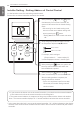
After entering into the installer setting mode,
select the central control address setting code
value by pressing the button.
* Setting address of central control code value
: 02
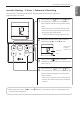
1
When pressing the button, the system will
be set up with the address value which has
been established at present.
3
When pressing the button and
button simultaneously for more than 3 seconds
after the setting has been completed, the
setting mode will be released.
- If there isn’t any button input for more than
25 seconds, the installer setting mode will
also be released.
4
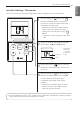
Set up the group nember and indoor unit with
the temperature adjustment(▲,▼) buttons.
For example, when setting as
[ Group number=2 Indoor number=3 ]
it will be displayed as shown in the left figure.
2
OPER
MODE
OPER
MODE
TEMP
Group number
Indoor unit number
OPER
MODE
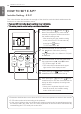
* In the case when the lock is set up at the central controller, ‘HL’ will be indicated on the display
window of the wired remote controller and the indoor unit will not be controlled by the remote
controller.
• If you connect the indoor unit to the central controller, you should set the network address
of the indoor unit so that the central controller could recognize it.
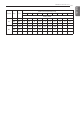
• The center-control address is composed of the group number and the indoor-unit number.
Note : The remote controller displays 'HL' if central controller has locked the remote controller .