
Owner's Manual




33
V
ideo Input
Video System Selection
1
Press the MENU button to display the On-Screen
Menu.Press Poi
nt ▲▼ buttons to select Input and
then press Point
► button or the
SELECT button.
2
Press Point ▲▼ buttons to select COMPONENT,
VIDEO or S-VIDEO and then press SELECT button.
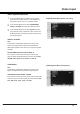
VIDEO System Menu (Video or S-video)
3
Press Point ▲▼ buttons to select System and then
press Point
►
button or SELECT button. Press Point
▲▼ button select the desired system and then press
the SELECT button.
VIDEO or S-VIDEO
Auto
The projector automatically detects an incoming video
system, and adjusts itself to optimize its performance.
When Video System is PAL-M or PAL-N, select the system
manually.
PAL/SECAM/NTSC/NTSC4.43/PAL-M/PAL-N
If the projector cannot reproduce proper video image,
select a specific broadcast signal format from among PAL,
SECAM, NTSC, NTSC 4 .43, PAL-M, and PAL-N.
COMPONENT
Auto
The projector automatically detects an incoming video
signal, and adjusts itself to optimize its perrformance.
VIDEO System Menu (Component)
COMPONENT VIDEO SIGNAL FORMAT
If the projector cannot reproduce proper video image, select
a specific component video signal format from among 480i,
576i, 480p, 576p, 720p, 1035i, and 1080i.