
Owner's Manual





34
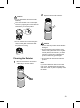
Cleaning the Filter
1
Separate the cover from the product.
•
For more information on how to
remove and mount the cover,
please see Removing Packing
Materials.
2
Remove dust from the ultra-ne lter
with a vacuum cleaner or soft brush.
Caution
•
Do not wash the lter with water. It may
reduce the lifespan of the lter.
•
Be careful not to damage the ultra ne
lter when you use a vacuum cleaner.
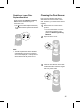
Replacing the Filter
1
Remove the cover and replace the
lter.
•
For more information on how to
remove the cover and replace
the lter, please see Removing
Packing Materials.
•
To avoid polluting the surroundings
when replacing the lter, place a
newspaper on the oor before you
remove the lter.
2
Once you have replaced the lter,
disable the lter replacement alert.
Disabling an Upper Filter
Replacement Alert
Press and hold the Speed and Indicator
buttons simultaneously for 3 seconds or
more.
•
The
(Upper Filter Replacement Alert)
is disabled and the replacement alarm is
reset.