
Owner's Manual





14
Product Overview
Front View
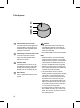
Upper part of the
air purier
Clean booster
Lower part of the
air purier
Upper air outlet/Clean booster
•
It discharges puried air through
the upper lter.
•
You can control the direction of the
air so that it reaches every corner
of the room.
Light Lamp
It displays the overall air quality using
a colored light.
Upper air inlet (top cover)
•
Air goes into the upper part of the
purier through the inlet. You may
remove the front or rear cover
separately.
Lower air outlet
It discharges puried air through the
lower lter.
Operation
Lower air inlet (bottom cover)
•
Air goes into the lower part of the purier
through the inlet. You may remove the
front or rear cover separately.
Status Panel
Use it to check the settings of the
product and the air quality.
Control Panel
Use it to set the product functions.
Receiver for Remote Control Signal
Air Ionizer
•
It generates negative ions and
removes harmful bacteria in the air.
•
It is built in the lower part of the air
purier.
•
The appearance or components of the product may dier depending on the model.