ENGLISH OWNER’S MANUAL LG Air Purifier Read before using product (safety instruction), use properly. About ensuring users safety and property. After careful read through the user manual, do keep it in a handy place. Model name : AS40GWSG0 P/NO : MFL68181317 www.lg.
SAFETY PRECAUTIONS 2 ENGLISH SAFETY PRECAUTIONS The precautions related with the safety shown below are to prevent unexpected hazard and damage through safe and accurate operation of the product. ! WARNING If not followed, It may cause death or major injury to the user. ! CAUTION If not followed, it may cause injury to the user or property damage. ! This symbol is to alerts you to hazardous practice and operation. Check carefully and follow instructions to avoid hazard.
SAFETY PRECAUTIONS 3 • Insert securely the power plug up to the end of its plug so that it will not be shaken. - If connection is unstable, it may cause fire. • Do not arbitrarily change or extend the power line. - It may cause fire and electric shock. • Do not allow water to be infiltrated into the product. - It may cause fire and electric shock. • Do not place rug etc. on the power cord. - If heavy object is placed on the rug because the cord is invisible, it may cause fire and electric shock.
SAFETY PRECAUTIONS ENGLISH ! CAUTION Installation • When installing near to TV or audio, provide more than 1 m of distance with them. - TV or audio may have malfunction. • When pulling out the power plug, pull out by grabbing the head of the plug. - It may cause injury or electric shock. • In kitchen, do not use the product as ventilation fan or hood for range. - The life will be shortened. • During the cleaning, make sure to stop the product and pull out the power plug.
SAFETY PRECAUTIONS • Do not insert inflammables inside the product. - It may cause fire or product failure. • Do not let the moisture emitted from the humidifier directly touch the product. - It may cause electric shock, fire, or product failure. • Do not open the rear panel while product is in operation. - Fan is rotating, and it has a risk of injury. ENGLISH • Completely dry the Dual Protection Filter in a shadow until there is no moisture after washing. - Otherwise, It may cause failure.
TABLE OF CONTENTS ENGLISH TABLE OF CONTENTS 2 SAFETY PRECAUTIONS 15 HOW TO INSTALL FILTERS 7 HOW TO INSTALL 7 Selecting installation place 7 Use the air purifier as this 15 Filter installation method before use 16 HOW TO CLEAN 8 NAME OF THE PARTS 16 How to clean 18 How to clean the filters 8 Rear side 18 How to clean exterior 8 Front side 18 How to clean the sensor 9 Operation indicator and control part 10 Filter system 11 HOW TO USE 11 Air purification operation 11 Ionizer
HOW TO INSTALL 7 Selecting installation place Main Unit • Places for easy power connection (close to socket) • Places without no obstacle to clog air inlet • Places with horizontal surface and rich air circulation ! WARNING If air purifier is installed in transportations (car or ship, etc), there may be a problem with the product, so do not install in transportations.
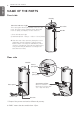
NAME OF THE PARTS ENGLISH NAME OF THE PARTS Front side Display Clean Air Indicator Light This is the light indicating the quality of the air in the room. The Odor sensor and dust sensor detect the room air quality, and displays for the cleanness. • Clean Air Indicator Light (Contaminated) Red → Orange → Yellow → Green (Clean) ❈ After the start of the operation, during the sensor stabilization period (2 minutes), Indicator lamp blinks in white color.
BEFORE USE ENGLISH Operation indicator and control part Filter Check indicator light Filter Check Ionizer Auto Sleep 1hr. 2hrs. 4hrs. 8hrs. Indicator Speed button Ionizer button Sleep mode button (3s) Ionizer Sleep Speed Indicator button Off Timer button Indicator 9 Off Timer Start/Stop button h It is when every display part is on. Start/Stop button Use to start and stop the product. Ionizer button It generates negative ion and removes various bacteria in the air.
NAME OF EACH PART ENGLISH Filter system Lower case (HEPA FILTER) Dual Protection Filter Top case (DEODORIZING FILTER) Triple Care Filter Allergy HEPA Filter Powered by 3M™ Filter name Function Dual Protection Filter It removes large dust particles so that it extends the life of Allergy HEPA Filter Powered by 3M™ Tech Allergy HEPA Filter Powered by 3M™ Tech It removes minute dust particles including dead ticks, flower powder, cigarette smoke (particle), minute dust, minute particle, animal fur an
HOW TO USE ENGLISH HOW TO USE Air purification operation It purifies the indoor air with clean and fresh air. 1. Start the air purifier by pressing the button. 2. Adjust the fan speed by pressing the Fan Speed button. • Whenever fan speed button is pressed, the fan speed sequentially repeat as AUTO → LOW → MID → HIGH → TURBO. Auto Low Mid High Turbo • When first turned on, it runs AUTO mode. AUTO mode controls air volume depending on the air quality.
HOW TO USE ENGLISH Sleep operation It provides quiet indoor atmosphere during the sleep. 1. Start the air purifier by pressing the button. 2. Press the sleep mode button. • It becomes low noise state for the sleeping. • When Sleep Mode is on, Sleep Mode is only displayed. • For a good night’s sleep, the Indicator lamp is turned off. 3. Fan speed at Sleep Mode.
HOW TO USE 13 ENGLISH Clean Air Indicator Lamp 1. Press the button. 2. Press the Clean air indicator. • You can be set and disable the Clean air indicator light. h Clean air indicator light operates as below. Display Clean Air Indicator Lamp h Once Sleep Mode is set, Clean air indicator Lamp is off. h You can be set and disable the Clean air indicator lamp by pressing the Indicator button. Lock function 1. Press the button. 2.
HOW TO USE ENGLISH Filter Check lamp 1. If the filter check lamp is on, turn off the power of the operating product by pressing button and unplug the power cord from the outlet. 2. Open rear panel of the product and check the filter. If the filters are contaminated, clean or replace. h Please refer to the page 15~17 for the filter cleaning and replacement method. Method1. Unplug the power cord from power outlet. Method2.
HOW TO INSTALL FILTERS 15 Filter installation method before use Use the filter after removing the vinyl packaging. 1. Pull and open the rear panel. 2. Separate the filter from the main unit. 3. Remove the vinyl packaging of the filter. 4. Install the filter that vinyl packing is removed. Remove the vinyl. 5. Close the rear panel. 6. Use the product on a flat place without obstacles. ! CAUTION If the vinyl packaging of the filter is not removed, air will not come out from the product.
HOW TO CLEAN ENGLISH HOW TO CLEAN 1. Turn off power by pressing the button during the operation. Unplug the power cord form the outlet. 2. Pull the filter handle and remove from the main body. • There may be a lot of dust in the filter net. Before separating the filter set, move the filter to a place for easy cleaning. 3. Hold the filter case and pull up the handle of Dual Protection Filter to remove. • The dust on the Dual Protection Filter may fall, so place newspaper, etc. underneath it.
HOW TO CLEAN 17 4. Disassemble the upper case and the lower case of the filter. (when replacing filters) Press the push parts on the both of the top case. 5. Disassemble the Triple Care. (when replacing filters) The two of Triple Care filters consist one set. When replacing and reassembling, thick deodorizer filter should be on the upper case. • If both of the deodorizer filters are not installed, it may cause of low performance. 6. Remove Allergy HEPA Filter Powered by 3M™ Tech.
HOW TO CLEAN ENGLISH How to clean various filters Filter type Dual Protection filter Classification For washing Allergy HEPA Filter Powered by For replace3MTM Tech ment Triple Care Filter Cleaning cycle How to clean About 1 month cycle cleaning Clean the Dual Protction Filter with a vacuum cleaner or brush, etc., adn if the contamination is severe, wash with water.
ENGLISH HOW TO STORE How to store If you do not use the product for extended periods of time, keep at dried and shaded place. 1. Start the air purifier by pressing the button. • If it has operated over an hour on a fine day, it can remove the moisture and mildews inside the product. 2. Stop the air purifier by pressing the button and unplug the power cord. Power plug 3. Separate the filter from the product, seal it well with vinyl, etc., and store at a cool place without direct sunlight.
TROUBLESHOOTING BEFORE CALLING FOR SERVICE ENGLISH TROUBLESHOOTING BEFORE CALLING FOR SERVICE If there is a problem with the product, check the following cases first before requesting service to the service center. Problem Check Actions It does not start at • Isn’t the power plug pulled out? all. • Isn’t the voltage too low? • Insert correctly into the socket. • Check if it is 220-240 V.
PRODUCT SPECIFICATION 21 ENGLISH PRODUCT SPECIFICATION Height Width Depth The external dimension, design and product standard can change to improve the quality of the product.
ENGLISH