
User's Guide printer Optra E312






49
Indicator lights
Secondary error
codes
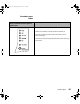
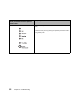
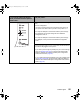
If your printer lights look like this
when you double-click the operator
panel button:
Then your printer:
memory is full (Memory Full).
• Reduce the complexity of the job and/or the resolution, or
• press the operator panel button with a brief button press to
resume printing, or
• reset the printer by pushing the operator panel button with a long
button press.
LA.bk Page 49 Thursday, February 8, 2001 2:19 PM