
User's Guide printer Optra E312






48
Chapter 4: Troubleshooting
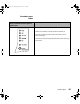
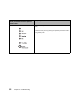
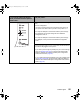
If your printer lights look like this: Then your printer:
• memory is full, or
• received a page that is too complex to print, or
• reduces the resolution of a formatted page to 300 dpi before
printing, or
•has a PPDS font error, or
• doesn’t have enough memory to save what is in the buffer
(resource save off), or
• doesn’t have enough memory to defragment flash memory
(insufficient defrag memory), or
• cannot communicate with the host computer (host interface
error).
Each of the errors described above has a unique, secondary error
code. Display the secondary error code by double-clicking the
operator panel button.
LA.bk Page 48 Thursday, February 8, 2001 2:19 PM