
Quick Reference Guide
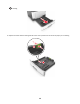
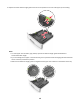
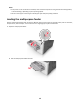
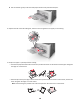
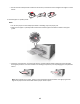

• Load letterhead faceup with the top edge entering the printer first. For two‑sided (duplex) printing, load
letterhead facedown with the bottom edge of the sheet entering the printer first.
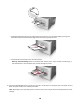
• Load envelopes with the flap on the left side facedown.
Warning—Potential Damage: Never use envelopes with stamps, clasps, snaps, windows, coated linings, or
self‑stick adhesives. These envelopes may severely damage the printer.
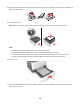
5 From the Embedded Web Server or from your computer, set the paper size and paper type in the Paper menu to
match the paper loaded in the multipurpose feeder.
Note: Depending on your operating system, access the Paper menu using Local Printer Settings Utility or Printer
Settings.
18