
Quick Reference Guide

Notes:
• If the printer is not connected to a network, then access the Paper menu using Local Printer Settings Utility
or Printer Settings, depending on your operating system.
• Set the correct paper size and type to avoid paper jams and print quality problems.
Loading the multipurpose feeder
Use the multipurpose feeder when printing on different paper sizes and types or specialty media, such as card stock,
transparencies, and envelopes. You can also use it for single‑page print jobs on letterhead.
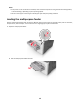
1 Open the multipurpose feeder.
1
2
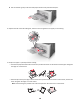
a Pull the multipurpose feeder extender.
15