Printer User's Guide
Manuals
Brands
Lexmark Manuals
Printer
030
151
152
153
154
155
156
157
158
159
160
3
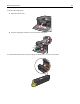
Remove the imagin
g unit:
a
Open the internal cover.
b
Push th
e imag
ing unit l
ock lever
up and pull
out t
he imagin
g unit.
1
4
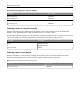
Locate the LED
wipe at the en
d of the imagi
ng unit. Make sure
it is in the c
orrect posit
ion.
Maintai
ning the pr
inter
151
1
...
...
149
150
151
152
153
...
...
225