
Graphics Tablet User's Manual

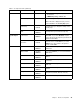
Table Of Contents
- Read this first
- Chapter 1. Product overview
- Chapter 2. Getting started
- Chapter 3. Wireless networks and devices
- Chapter 4. Battery and ac power
- Chapter 5. Using your tablet
- Chapter 6. ThinkPad Tablet 2 options
- Chapter 7. Security
- Chapter 8. Recovery overview
- Chapter 9. Advanced configuration
- Chapter 10. You and your tablet
- Chapter 11. Troubleshooting problems
- Chapter 12. Getting support
- Appendix A. Regulatory information
- Wireless related information
- Export classification notice
- Electronic emission notices
- Federal Communications Commission (FCC) Declaration of Conformity
- Industry Canada Class B emission compliance statement
- European Union - Compliance to the Electromagnetic Compatibility Directive
- German Class B compliance statement
- Korea Class B compliance statement
- Japanese VCCI Class B statement
- Japan compliance statement for products which connect to the power mains with rated current less than or equal to 20 A per phase
- Lenovo product service information for Taiwan
- Additional regulatory information
- Appendix B. Environmental, recycling, and disposal information
- Lenovo recycling statement
- Japan recycling statements
- Recycling information for Brazil
- Important WEEE information
- Battery recycling information for Taiwan
- Battery recycling information for the United States and Canada
- Battery recycling information for the European Union
- China recycling information for Waste Electrical and Electronic Equipment (WEEE)
- Appendix C. Notices
- Appendix D. Restriction of Hazardous Substances Directive (RoHS)

Table1.Securitymenuitems(continued)
Menuitem
Submenuitem
Value
Comments
SecureBoot
•Disabled
•Enabled
EnableordisableUEFISecureBootfeature.
Windows8operatingsystemrequiresthisfeature
tobeenabled.
PlatformMode
•UserMode
•SetupMode
Specifythesystemoperatingmode.
SecureBootMode•StandardMode
•CustomMode
IndicatesSecureBootmodeisstandardmode
orcustommode.
ResettoSetupMode
•Enter
Thisoptionisusedtoclearthecurrentplatform
keyandputthesystemintosetupmode.Youcan
installyourownplatformkeyandcustomizethe
SecureBootsignaturedatabasesinsetupmode.
SecureBootmodewillbesettocustommode.
SecureBoot
RestoreFactorykeys•EnterThisoptionisusedtorestoreallkeysand
certicatesinSecureBootdatabasestofactory
defaults.AnycustomizedSecureBootsettings
willbeerased,andthedefaultplatformkeywill
bere-establishedalongwiththeoriginalsignature
databasesincludingcerticateforWindows8
operatingsystem.
Startupmenu
Youmightneedtochangethetabletstartupsettings.Todoso,tapStartupfromtheThinkPadSetupmenu.
Attention:
•Afteryouchangeyourstartupsequence,youmustbeextremelycarefulnottospecifyawrongdevice
duringacopy,asave,oraformatoperation.Ifyouspecifyawrongdevice,yourdataandprograms
mightbeerasedoroverwritten.
•IfyouareusingtheBitLockerdriveencryption,youshouldnotchangethestartupsequence.BitLocker
driveencryptiondetectsthechangeofstartupsequenceandlocksthetabletfrombooting.
Changingthestartupsequence
Tochangethestartupsequence,dothefollowing:
1.TapBoot.Thedefaultbootlistisdisplayed,showingtheorderinwhichdeviceswillbestartedup,even
devicesthatarenotattachedtoorinstalledonyourtabletarelisted.
2.IntheBootsubmenu,tapthemenuitemtospecifythestartupsequencethatrunswhenyouturnon
thepower.
3.TapSaveandExittosavethechangesandrestartthesystem.
ThefollowingtableliststheStartupmenuitems.
Notes:
•Defaultvaluesareinboldface.
•Ineachsubmenu,tapthedefaultvaluetoshowselectableoptionsandselectadesiredoption.
•Someitemsaredisplayedonthemenuonlyifthetabletsupportsthecorrespondingfeatures.
42UserGuide