
Graphics Tablet User's Manual
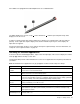
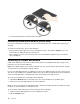
Table Of Contents
- Read this first
- Chapter 1. Product overview
- Chapter 2. Getting started
- Chapter 3. Wireless networks and devices
- Chapter 4. Battery and ac power
- Chapter 5. Using your tablet
- Chapter 6. ThinkPad Tablet 2 options
- Chapter 7. Security
- Chapter 8. Recovery overview
- Chapter 9. Advanced configuration
- Chapter 10. You and your tablet
- Chapter 11. Troubleshooting problems
- Chapter 12. Getting support
- Appendix A. Regulatory information
- Wireless related information
- Export classification notice
- Electronic emission notices
- Federal Communications Commission (FCC) Declaration of Conformity
- Industry Canada Class B emission compliance statement
- European Union - Compliance to the Electromagnetic Compatibility Directive
- German Class B compliance statement
- Korea Class B compliance statement
- Japanese VCCI Class B statement
- Japan compliance statement for products which connect to the power mains with rated current less than or equal to 20 A per phase
- Lenovo product service information for Taiwan
- Additional regulatory information
- Appendix B. Environmental, recycling, and disposal information
- Lenovo recycling statement
- Japan recycling statements
- Recycling information for Brazil
- Important WEEE information
- Battery recycling information for Taiwan
- Battery recycling information for the United States and Canada
- Battery recycling information for the European Union
- China recycling information for Waste Electrical and Electronic Equipment (WEEE)
- Appendix C. Notices
- Appendix D. Restriction of Hazardous Substances Directive (RoHS)

SometabletsareequippedwithaTabletDigitizerPenasastandardfeature.
TheTabletDigitizerPenconsistsofatip1andaclickbutton2.Holdthepenandpointthetipatthe
displaytomovethecursor.
Tomakeaselection(singleclick),tapthedisplayoncewiththepen.Todouble-click,taptwicewithout
pausing.Todoaright-click,tapthedisplayonceandthenholdthetipofthepenonthedisplay;the
right-clickiconappears.
Pressingtheclickbuttontotakeascreencaptureandsnipthecapturedimage.Formoreinformation,see
“Usingthescreencapturefunction”onpage22
.
Checkingforinstalledapplications
Tocheckforalloftheinstalledapplications,swipeinfromtherightedgeofthescreentodisplaythecharms.
ThentapAppwithoutenteringasearchitem.
ThefollowingtableprovidesabriefintroductiontosomeLenovoapplicationsthatmightbepreinstalledon
yourtablet.
Note:PreinstalledLenovoapplicationsvarybygeographiclocationsandaresubjecttochange.
ApplicationDescription
LenovoCloud
solution
Access,view,upload,ordownloadmassiveresources,software,andinformationonaremote
cloudserverinasecuredenvironment.
LenovoCompanionGettheinformationabouttheaccessoriesforyourtablet,viewblogsandarticlesaboutyour
tablet,andcheckforrecommendedprograms.
LenovoSettings
Enhanceyourexperiencebyturningyourtabletintoaportablehotspot,sharingyourInternet
connectionusingtheNFCtechnology,conguringcameraandmicrophonesettings,optimizing
yourpowersettings,andcreatingandmanagingmultiplenetworkproles.
LenovoMobile
Access
SigninwithyourMicrosoftaccounttoregisterforservice,purchasedataplans,makepayments
online,andmanageyourmobileaccount.
LenovoQuickClip
UsetheThinkPadDigitizerPentocapturethescreenandsnipthecapturedimage.
LenovoSupport
RegisteryourtabletwithLenovo,checkthetablethealthconditionandbatterystatus,view
usermanualsforyourtablet,getthewarrantyinformationforyourtablet,andexplorehelp
andsupportinformation.
Lenovo
ThinkVantageTools
ProvideeasyaccesstovariousLenovoapplications,suchasSystemUpdate,Password
manager,andsoon.
Chapter2.Gettingstarted9