
Graphics Tablet User's Manual

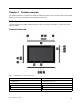
Table Of Contents
- Read this first
- Chapter 1. Product overview
- Chapter 2. Getting started
- Chapter 3. Wireless networks and devices
- Chapter 4. Battery and ac power
- Chapter 5. Using your tablet
- Chapter 6. ThinkPad Tablet 2 options
- Chapter 7. Security
- Chapter 8. Recovery overview
- Chapter 9. Advanced configuration
- Chapter 10. You and your tablet
- Chapter 11. Troubleshooting problems
- Chapter 12. Getting support
- Appendix A. Regulatory information
- Wireless related information
- Export classification notice
- Electronic emission notices
- Federal Communications Commission (FCC) Declaration of Conformity
- Industry Canada Class B emission compliance statement
- European Union - Compliance to the Electromagnetic Compatibility Directive
- German Class B compliance statement
- Korea Class B compliance statement
- Japanese VCCI Class B statement
- Japan compliance statement for products which connect to the power mains with rated current less than or equal to 20 A per phase
- Lenovo product service information for Taiwan
- Additional regulatory information
- Appendix B. Environmental, recycling, and disposal information
- Lenovo recycling statement
- Japan recycling statements
- Recycling information for Brazil
- Important WEEE information
- Battery recycling information for Taiwan
- Battery recycling information for the United States and Canada
- Battery recycling information for the European Union
- China recycling information for Waste Electrical and Electronic Equipment (WEEE)
- Appendix C. Notices
- Appendix D. Restriction of Hazardous Substances Directive (RoHS)

7Screenrotationlockbutton
15Windowsbutton
8MiniHDMIconnector16Multitouchscreen
1T abletDigitizerPenstorage
IfyourtabletisshippedwithaTabletDigitizerPenoryouhavepurchasedone,usethestorageslottostoreit.
2SIMcardslot
OpenthecovertoaccesstheSubscriberIdenticationModule(SIM)cardslot.InsertaSIMcardtoestablish
awirelessWideAreaNetwork(WAN)connection.ForinstructionsonhowtoinstalltheSIMcard,see
“InstallingtheSIMcard”onpage11
.
Note:TheSIMcardslotisnotfunctionalonWi-Fi-onlymodels.
3MicroSDcardreader
OpenthecovertoaccessthemicroSDcardreader.Installasecuredigital(SD)cardintothemicro
SDmediacardreaderfordataaccessorstorage.See“UsingthemicroSDcardreader”onpage23
for
moreinformation.
4Powerbutton
Pressthepowerbuttontoturnonthetablet.
Ifyourtabletstopsrespondingandyoucannotturnitoff,pressandholdthepowerbuttonforfourseconds
ormore.
5Headphoneormicrophoneconnector
Connectheadphonestotheconnectortolistentostereosoundfromthetabletorconnectamicrophone
torecordaudioormakecalls.Youalsocanconnectaheadsetwithanintegratedmicrophonethatusesa
combinedaudio/microphoneconnector.
6Volumecontrolbuttons
Pressthevolumeupordownbuttontoadjustthetabletvolume.
7Screenrotationlockbutton
Pressthebuttontodisablethescreenauto-rotationfunction.Pressagaintoenableit.
8MiniHDMIconnector
Yourtablethasaminihigh-denitionmultimediainterface(HDMI)connector,adigitalaudioandvideo
interfacethatcanconnectacompatibledigitalaudiodeviceorvideodisplaysuchasahighdenition
television(HDTV).Formoreinformation,see“UsingHDMIdevices”onpage24.
9ThinkPadT ablet2Dockconnector
UsethisconnectortoconnectaThinkPadTablet2Dock.TheThinkPadTablet2Dockisavailableasan
optionfromLenovoathttp://www.lenovo.com/accessories/services/index.html.Formoreinformation,see
“UsingtheThinkPadTablet2Dock”onpage30.
10Emergencyresethole
Ifyourtabletstopsrespondingandyoucannotturnitofforturnitonbypressingandholdingthepower
button,resetthetabletbyinsertingastraightenedpaperclipintotheemergencyresethole.
2UserGuide