Desktop Computer Hardware Installation and Replacement Guide
Manuals
Brands
Lenovo Manuals
Desktop
ThinkCentre 9708
21
22
23
24
25
26
27
28
29
30
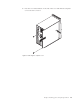
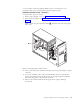
2.
At
the
rear
of
the
computer
,
press
the
release
button
1
to
open
the
adapter
latch
2
and
remove
the
slot
cover
.
Figure
9.
Opening
the
adapter
latch
Chapter
3.
Installing
options
and
replacing
hardwar
e
17
1
...
...
23
24
25
26
27
...
...
64