
Personal Computer User's Guide




3.Removethecomputercover.See“Removingthecomputercover”onpage41.
4.LocatetheheatsinkandfanassemblyforGPU.See“Locatingcomponents”onpage13.
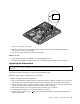
5.NotetheroutingoftheGPUfancableandthendisconnecttheGPUfancablefromthesystemboard.
6.FollowthissequencetoremovethefourscrewsthatsecuretheheatsinkandfanassemblyforGPU
tothesystemboard:
a.Partiallyremovescrew1,thenfullyremovescrew2,andthenfullyremovescrew1.
b.Partiallyremovescrew3,thenfullyremovescrew4,andthenfullyremovescrew3.
Note:Carefullyremovethefourscrewsfromthesystemboardtoavoidanypossibledamagetothe
systemboard.ThefourscrewscannotberemovedfromtheheatsinkandfanassemblyforGPU.
Figure44.RemovingtheheatsinkandfanassemblyforGPU
7.LiftthefailingheatsinkandfanassemblyforGPUoffthesystemboard.
Notes:
a.YoumighthavetogentlytwisttheheatsinkandfanassemblyforGPUtofreeitfromthe
microprocessor.
b.DonottouchthethermalgreasewhilehandlingtheheatsinkandfanassemblyforGPU.
8.PositionthenewheatsinkandfanassemblyforGPUonthesystemboardsothatthefourscrewsare
alignedwiththecorrespondingholesinthesystemboard.
9.FollowthissequencetoinstallthefourscrewstosecuretheheatsinkandfanassemblyforGPU,as
showninFigure44“RemovingtheheatsinkandfanassemblyforGPU”onpage67.
a.Partiallytightenscrew1,thenfullytightenscrew2,andthenfullytightenscrew1.
b.Partiallytightenscrew3,thenfullytightenscrew4,andthenfullytightenscrew3.
10.ConnecttheGPUfancabletothesystemboard.See“Locatingpartsonthesystemboard”onpage16.
Chapter5.Installingorreplacinghardware67