
Personal Computer User's Guide


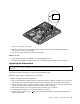


Figure36.Installingthethermalsensor
9.Connectthethermalsensorcabletothesystemboard.See“Locatingpartsonthesystemboard”
onpage16.
10.AlignthescrewholesintheVESAmountbracketwiththoseinthechassisandtheninstallthescrewsto
securetheVESAmountbrackettothechassis.
Whattodonext:
•Toworkwithanotherpieceofhardware,gototheappropriatesection.
•Tocompletetheinstallationorreplacement,goto“Completingthepartsreplacement”onpage73
.
Replacingtheintegratedcamera
Attention:
Donotopenyourcomputerorattemptanyrepairbeforereadingandunderstanding“Importantsafetyinformation”
onpagev.
Thissectionprovidesinstructionsonhowtoreplacetheintegratedcamera.
Note:Theintegratedcameraisavailableonlyinsomemodels.
Toreplacetheintegratedcamera,dothefollowing:
1.Removeallmediafromthedrivesandturnoffallattacheddevicesandthecomputer.Then,disconnect
allpowercordsfromelectricaloutletsanddisconnectallcablesthatareconnectedtothecomputer.
Chapter5.Installingorreplacinghardware59