
Personal Computer User's Guide


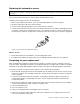



3.InstalltheWiFiadaptercardintothePCIExpressx1slotonthesystemboard.See“Locatingpartson
thesystemboard”onpage12.
4.IftheinstalledWiFicardmodulesupportstheBluetoothfunction,useaBluetoothcabletoconnectthe
BluetoothconnectorontheWiFiadaptercardtothefrontUSBconnectoronthesystemboard.
5.PivotthecardlatchtotheclosedpositiontosecuretheWiFiadaptercard.
Figure69.InstallingtheWiFiadaptercard
Whattodonext:
•Toworkwithanotherpieceofhardware,gototheappropriatesection.
•Tocompletetheinstallationorreplacement,goto“Completingthepartsreplacement”onpage85.
InstallingorremovingtherearWiFiantenna
Attention:
Donotopenyourcomputerorattemptanyrepairbeforereadingandunderstandingthe“Importantsafetyinformation”
onpagev.
ThissectionprovidesinstructionsonhowtoinstallorremovetherearWiFiantenna.
InstallingtherearWiFiantenna
ToinstalltherearWiFiantenna,dothefollowing:
1.Turnoffthecomputeranddisconnectallpowercordsfromelectricaloutlets.
2.InstalltherearWiFiantennatotherearWiFiantennacableconnectorattachedontherearofthe
computer.
3.Adjusttheangleoftherearantennatolowertheriskofbreakingtheantennabyaccident.
80ThinkCentreUserGuide