
User guide



7
EN
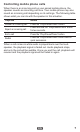
Controlling mobile phone calls
When there is an incoming call on your paired mobile phone, the
speaker sounds an incoming call tone. Your mobile phone may also
sound an incoming call depending on its settings. The following table
shows what you can do with the speaker in this situation.
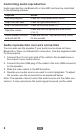
Objective Action
Answer an incoming call Press the “Play/Pause/Phone” button.
Reject an incoming call
Press and hold the “Play/Pause/Phone” button
for two seconds.
End a call Press the “Play/Pause/Phone” button.
Redial
Press the “Play/Pause/Phone” button twice in
quick succession.
When a call comes in while audio is played back over the loud-
speaker, the playback signal is faded out. Audio playback stops,
and only the call will be audible. Once you end the call, playback will
resume and the playback signal will be faded in again.