
User guide


6
EN
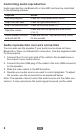
Controlling audio reproduction
Audio reproduction via Bluetooth or microSD card can be controlled
in the following manner:
Objective Action
Start/stop playback Press the “Play/Pause/Phone” button.
Skip to the next track Press the right arrow button (>).
Skip to the previous track Press the left arrow button (<).
Adjust the volume
Press and hold the appropriate arrow button
(< or >).
Switch between microSD
card and AUX IN
Press and hold the “Play/Pause/Phone” button
for two seconds.
Audio reproduction over wire connection
You can also use the speaker if your audio source does not have
Bluetooth or there is no Bluetooth connection. Use the supplied cable
for this purpose.
1. Connect the 3.5-mm mini jack of the cable to the headphones or
line output of your audio source.
2. Connect the mini USB plug of the cable to the mini USB connector
on the speaker.
3. Slide the main switch to the MP3 position.
4. Operate your audio source as usual to control playback. To adjust
the volume, use the arrow buttons as explained below.
Note: The speaker cannot control the audio source via the cable con-
nection. It only reproduces the audio signal received via the cable.