
Instruction Manual


SECTION A: GENERIC NSTRUCTIONS ON USING THE HPM CONNECT APP
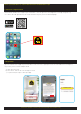
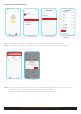
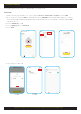
SHARE FROM HOME MANAGEMENT
Click on Me icon
Select Home Management
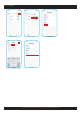
Select Create a home
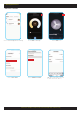
Scroll down and Select
Add Member
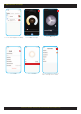
■ Once the member is selected, the new member receives a notification from the HPM Connect App.
■ After accepting the invitation, the new member can now access all devices paired with HPM Connect App.
Note: 1. If only one smart product is installed, it can only be operated by one paired smart device at a time. The other
smart device which is not controlling should close the Hpm Connect App.
2. To operate using multiple smart devices you must have multiple smart products.
3
John
John.bell@legrand.com.au
Create a home
Tom
Joe
Pop
Ralf
Add Member
John
John.bell@legrand.com.au
Tom
Tom.pan@legrand.com.au
Joe
Joe.lau@legrand.com.au
Pop
Pop.law@legrand.com.au
Click on Accept