
Instruction Manual



LE12157AB 11/2021
Paper
Please note that the terms used in this instruction sheet are trademarks.
■ The Bluetooth word is registered trademark owned by Bluetooth SIG, Inc. 2. iOS is a trademark or registered trademark of
Cisco. 3. Android is a trademark of Google, Inc.
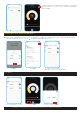
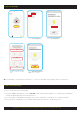
■ To use all functions of this HPM Smart Downlight it is required to have a compatible iOS or Android device installed with HPM Connect App.
■ The privacy policy is available on App store / Play store.
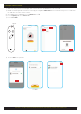
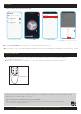
■ If the BT button on the remote is pressed for 5 seconds and released the fan is reset and is available for
pairing with another device.
■ If the fan is removed from a smart device - it becomes available for pairing with another smart device.
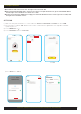
SECTION D: INSTRUCTIONS ON USING THE HPM CONNECT APP FOR SMART FAN
15
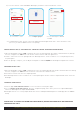
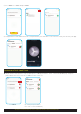
2. Set Timer
Set the timer and press Done
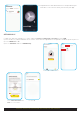
■ By sliding Switch All button all the paired fans can be turned ON/OFF at the same time.
Click Timer function
Click on Edit
Select the fan to set timer
3. Reset the Smart Fan
Done
" Timer function is only for Fan and not for Light"
(Select Cancel to cancel timer selection)
2
H
4
H
8
H
O
N
/
O
F
F
H
I
M
E
D
LO
W
O
F
F
B
T
BT button
■ After pairing, once fan is switched OFF and turned ON the fan with start at medium speed regardless of your previous settings
.