
Instruction Manual
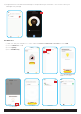
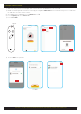
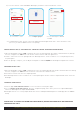
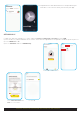

i) Make sure that you have a working Remote Control. Ensure 2x AAA batteries are inserted.
ii) Enable networking mode on Remote Control by pressing both ON & OFF buttons simultaneously for 5 seconds until
the indicator on remote starts to flash.
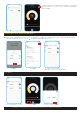
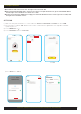
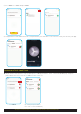
iii) Go to HPM Connect App and click on Add Device or “ ”
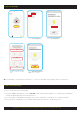
iv) Select Lighting and select Auto Scan.
v) Select Go to Add.
vi) Click on Done once paired.
+
SECTION C: INSTRUCTIONS ON PAIRING/UNPAIRING THE REMOTE CONTROL FOR DOWNLIGHT
10
1. Pairing the Remote Control
Click Next
Add Device
ON
OFF
Indicator
Lighting
Next
Done