
Instruction Manual
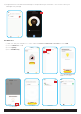
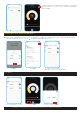
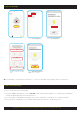

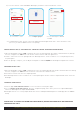

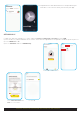
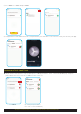

Click on Resetting Device. Click on Resetting Devices
Follow the steps for resetting
device.
Click confirmation button and
Next once reset is done.
3. Reset the Downlight
4. Wall Switch for Downlight
SECTION B: INSTRUCTIONS ON USING THE HPM CONNECT APP FOR SMART DOWNLIGHT
9
Next
started blinking.
Add Device
Lighting
Next
started blinking.
Next
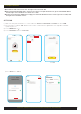
Step 2
Switch light OFF and back ON
(OFF periods 1- 2 seconds)
Step 1
Power ON the device and confirm the light is O
Step 3
Confirm the light has started blinking. If the light
does not blink and stays ON, repeat the process.
How to reset downlight
N
■ If the downlight is removed from a smart device - it becomes available for pairing with another smart device.
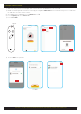
If you are using wall switch for downlight,
1. First power ON the downlight then switch OFF/ON 5 times (OFF period should be1-2 seconds).Then the downlight
should start blinking (slowly like breathing 3 times).
2. You can now pair the downlight following the instructions on pairing section. Adjust the settings as required.
3. After pairing, once downlight is switched OFF and turned ON the previous settings will prevail.