
User`s manual


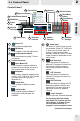


Channel Number of the
live FM radio broadcast.
Frequency of the current
live FM radio channel.
Indicates playback is in
progress.
Name of the sound file
that is being played
back.
Length of played video
of the ongoing playback.
Icon Playback indicator. If it
lights blue, playback is in
progress. If it shows two
paralleled vertical lines,
playback is being
paused.
Icon Recording indicator. If it
lights red, recording is in
progress.
Icon Pause indicator. If the
status shows this icon
instead of , the
playback of a recorded
sound file is being
paused.
Channel Number of the live
FM radio broadcast.
Frequency of the current live
FM radio channel.
Channel Name of the live FM
radio broadcast.
Clock that tells time.
Indicates there is ongoing
recording.
Name of the sound file that is
being recorded.
Length of recorded video of
the ongoing recording.
Icon Playback indicator. If it lights
blue, playback is in progress.
If it shows two paralleled
vertical lines, playback is
being paused.
Icon Recording indicator. If it
lights red, recording is in
progress.
Icon Pause indicator. If the status
shows this icon instead of
, the playback of a recorded
sound file is being paused.
WinFast PVR2 Software Manual
1
OVERVIEW
1-5 Reading the Status Window
1-5-5 Status Window in FM Mode
1-5-6 Status Window in FM Playback Mode
FM mode
With no recording in progress
With recording in progress
FM Playback mode
(Only Applicable to Specific Products)
6