
User`s manual






5
5-3 BIOS Setting for Power
ON/Off by Remote Control
BIOS Setting for Power On/Off by Remote Control
WinFast PVR2 provides you a convenient function to use your remote control to power
on/off you computer. Please follow the instruction below to make sure that it can function
correctly.
1. Turn on the computer. Before entering Windows, please press “Delete” to enter BIOS
settings. (Different motherboards may have different ways to enter BIOS settings.)
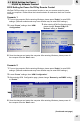
2. Locate “Power” settings, then “APM
Configuration”.
3. After entering APM Configuration page,
please change “Power On By PCI
Devices” setting to “Enable”.
4. Save the changes and restart the computer. After entering Windows, please power off
the computer from the “Start” menu.
Scenario 1
Scenario 2
1. Turn on the computer. Before entering Windows, please press “Delete” to enter BIOS
settings. (Different motherboards may have different ways to enter BIOS settings.)
2. Locate “Power” settings, then “ ”.APM Configuration
3. After entering page, please change “Resume by on PME#” setting
to “Enable”.
APM Configuration
4. Save the changes and restart the computer. After entering Windows, please power off
the computer from the “Start” menu.
(Continued next page)
REMOTE CONTROL
45