
User`s manual


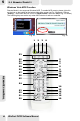




Press to open/close MCE.
Press these buttons to Rewind/Fast Forward.
Switch MCE to My TV.
Press to open DVD menu.
Move the cursor up or down.
Return to the last screen.
Press to show the DVD subtitle selections.
Press to show the DVD language selection.
Press to switch to the last-viewed channel.
Press to display the video full- screen.
Press to execute your selection.
Press to open MCE setting page.
Press to mute the audio.
Press to clear what you've entered.
Press to switch to EPG mode.
Press to enter a .
Press to start recording.
Change the Input source in FM Input mode.
Press to start or pause the playback.
Press to switch the channel up/down.
Press to stop playback.
Press these buttons to jump to previous/next selection.
Press to enter a dot.
For entering a TV channel number or radio frequency to switch to
that channel.
Press to enter a .]
Press to increase/decrease the volume.
Press to open MCE main menu.
Press to cancel the selection.
Press to move the cursor left/right.
Browse the Recorded TV folder.
Browse the My Music folder.
Browse the My Picture folder.
Browse the My Video folder
1 Power
2 TV
3 FM (only
applicable to specific
products)
4 DVD
5 Setting
6 Mute
7 Full Screen
8 Enter
9 Return
10 Up/Down
11 Subtitle
(DVD function key)
12 Rewind/
Fast Forward
13 Language
14 EPG
15 Clear
16 Recall
17
18 REC
19 CH+, CH-
20 VOL+, VOL-
21 REC Stop
22 ]
24 Numeric Keys
25 Stop
26 Play/Pause
27 Previous/Next
28 Menu
29 Left/Right
30 Cancel
33 Record TV
My Music
My Picture
My Video
(Left to right)
Button
Function
31 Standby
Press to switch to standby mode.
32 Teletext/c.c.
Close caption.
23 Dot
Press to stop recording.
5-1 Remote Model 1
5
REMOTE CONTROL
43