
User`s manual






5-1 Remote Model 1
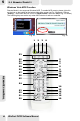
Windows Vista MCE Function
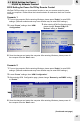
Remote Model 1 also supports Windows MCE. To enable MCE remote, please right-click
on the icon on the toolbar at the bottom right of the screen (as Fig. 32 shows). Choose
"Setting", then check the box in front of "MCE Remote" then click OK(as Fig. 33 shows).
The following keys are active only when MCE window is active or selected.
1
2
3
4
5
6
7
8
9
10
11
12
13
14
15
16
17
18
20
21
22
23
24
25
26
27
28
29
30
19
31
32
33
REMOTE CONTROL
WinFast PVR2 Software Manual
5
42
Fig. 32
Fig. 33
Remote Controller
MCE Remote
Capture Device
Enable