
User`s manual


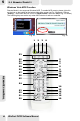




5-1 Remote Model 1
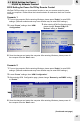
Press to open WinFast PVR2 function choosing menu (as Fig.34
shows on page 47), or press to closeWinFast PVR2 application.
Press these buttons to Rewind/Fast Forward.
Change the input source in TV Input mode.
Press to open PowerDVD.
Press to switch the channel up or down.
Press to start channel preview.
In analog TV mode: Press to change the video format between
PAL and SECAM. In digital TV mode: Press to change the
display mode to Pan&Scan. When used as DVD function key,
press to show the DVD subtitle selections.
Press to switch to the EPG mode.
Press to switch to the last-viewed channel.
Used to switch between languages if more than one language is
available.
Press to display the video full- screen.
Press to execute your selection.
Hide the application.
Press to mute the audio.
In Video input mode, press to take a snapshot; in FM mode, to
add the current channel to the channel list.
Display the current channel number on the screen.
Change the input source in Video Input mode.
Press to switch on/off TimeShifting.
Press to start recording.
Change the Input source in FM Input mode.
Press once to adjust brightness; twice, contrast; thrice, saturation.
Press to stop the recording.
Press these buttons to jump to previous/next selection.
Press to decrease or increase the volume.
For entering a TV channel number or radio frequency to switch
to that channel.
Press to start or pause the playback.
Press to stop playback.
Press to switch between PIP/POP/PAP display and a single
display.
Press to cancel the selection or close the dialog box.
In areas where Teletext and/or close-captioning is provided by
the local cable company, press this button to switch between or
turn on/off whichever functions that are available.
Press to select sleep mode. Once to set the timer at 30 minutes;
twice, 60; thrice, 90; four times, 120; five times, sleep mode off.
Keep pressing it will alternate the mode in the same order.
Valid when Teletext is available. The colors of the button
outlines correspond with those of the TV screen.
1 Power
2 TV
3 FM (only
applicable to specific
products)
4 DVD
5 Boss Key
6 Mute
7 Full Screen
8 Enter
9 Channel Surf
10 CH+, CH-
11 Subtitle
12 Rewind/
Fast Forward
13 EPG
14 Video
15 Audio
16 Display
17 Snapshot/M
18 Recall
19 TimeShifting
20 REC
21 REC Stop
22 PIP/POP/PAP
23 Numeric Keys
24 Stop
25 Play/Pause
26 Previous/Next
27 Menu
28 VOL-, VOL+
29 Cancel
30 Sleep
31 Teletext/c.c.
32 Teletext Selection
Button
Function
5
REMOTE CONTROL
41