
User`s manual





WinFast PVR2 Software Manual
2
Introduction Features
WinFast PVR2 Software Manual
3
FM MODE
3-7 Playback Control Panel
(Only Applicable to Specific Products)
FM Playback mode enables you to play audio files recorded from FM radio.
For controls identical with those of FM mode, refer back to that section.
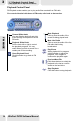
Playback Control Panel
Channel Slider knob
You can slide the knob left and right
to surf through all frequencies of live
FM radio.
Playback Slider Knob
Close Playback Panel
Click this button to go back in FM
mode.
Pull the knob left or right to control
the playback progress. It is very
useful when you wish to search for a
certain part of the recording.
Mute Playback
Click to mute the audio of the
sound file being played back.
Mute Live Radio
Click to mute the audio of the live
FM radio that's being
broadcasted.
Play/Pause
When playback is in progress,
click this button to pause the
playback. Click it again to
continue the playback again.
Previous/Next File
Click these buttons to switch the
playback to the last or next file
saved on the hard drive.
Stop Playback
Click this button to stop playback.
38