
User`s manual





WinFast PVR2 Software Manual
2
Introduction Features
WinFast PVR2 Software Manual
3
FM MODE
3-5 Channel List
(Only Applicable to Specific Products)
FM Channel List
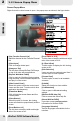
Click on the control panel, then the second tab to open the FM Channel List dialog box
as shown in the figure below.
[Edit] button
Highlight a channel and click this button to
edit the channel name.
[Delete] button
Select a channel and click this button to
delete it from the channel list.
[Save] button
Click this button after making any
changes to save them.
[Set Favorite Channel Group]
Right click on a channel to bring up a pop-
up menu as shown in the figure. You can
click Set Favorite Channel Group to
categorize the channel in a certain group
which is indicated in the heart-shaped
icons as 1, 2 or 3.
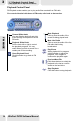
[Insert]
Highlight a channel and click this button
to open the Setting Favorite Channel
dialog box as shown in the figure below.
[Name]: You can name the channel as
desired.
[Frequency]: If you know the
frequency of the channel, you can type
it in this field.
[Preset]: The number set here will be
that of the favorite channel button on
the control panel.
For the Auto Scan function, please refer to
page 34.
36