
User`s manual





2
TV MODE
2-11 Playback Mode
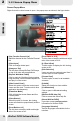
Picture-in-Picture Twinview
Exit WinFast PVR2
Click to close the application.
Maximize
Click to maximize the viewing
window.
Minimize
Frameless
Click to hide the screen frame
and the control panel. Double-
click the screen in order to
restore the control panel.
Click to maximize the viewing
window only.
PIP Twinview
Close Twinview
Press the PIP Twinview button to
view two TV programs in picture-in-
picture style.
To close Twinview, click .
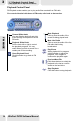
Screen Controls
Picture-on-Picture Twinview
Press POP Twinview button to view
two TV programs in picture-on-picture
style. Use and buttons for program
selections on the sub-screen.
To close Twinview, click .
POP Twinview
Close Twinview
Channel Up/ Down
Note:
For the three twinview modes
(PAP, PIP and POP), only
digital TV supports two live
TV programs. In analog TV,
you can only watch one live
TV program, and one
playback video.
2-11-2 Twinview
31