
User`s manual



2-3-5 Analog Video Capture Setting
2-3 Analog TV
(Only Applicable to Specific Products)
Analog Video Capture Setting
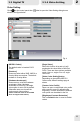
Click on the control panel, then label to open the Analog Video Capture Setting
dialog box as shown in the figure below.
[Analog Capture Profile]
Please see Page 28 for detail.
[Edit] button
Click to edit a capture profile.
[Delete] button
Click to delete a capture profile.
[Add] button
Click to add a capture profile.
[Image Format]
The formats available are: JPEG,
BITMAP, PNG, and TIFF.
[Number of images/Time interval (ms)]
Users can select the number of
snapshots taken between a designated
time interval.
[WorkArea Folder]
To change the folder for the saved media files, please click on the "Browse" button to
browse the directory for saving the recorded media files. All recorded media files will be
saved in the directory.
Change the Folder for Saved Media Files
2-3-6 Change the Folder for Saved Media Flies
WinFast PVR2 Software Manual
2
TV MODE
18
Fig. 16