
User`s manual



2
TV MODE
2-3-3 Device Setting
Device Setting
2-3 Analog TV
(Only Applicable to Specific Products)
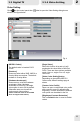
Click on the control panel, then label to open the Device Setting dialog box as
shown in the figure below.
[Recording Volume]
Move the scroll bar to turn up/down the
volume. What is set here will also affect
the playback volume. To prevent noise
during the playback, turn down the volume
during the recording process.
[Analog Video Device]
All available video devices are shown in
the list.
[Analog Audio Device]
Select an audio output device from the
drop-down list.
[Mixer Device(Playback)]
Select an audio output device from the
drop-down list.
[Mixer Device(Recording)]
Select an audio output device from the
drop-down list.
[Sound Card Type]
Users can choose to auto-select the sound
card type or choose sound card as C-
Media HD Audio / Sound Blaster Audigy
(Audigy 2)
[Video Standard]
Video standards PAL, NTSC and SECAM
are available for specific countries.
15
For "Audio-Out Control Line" & "Recording Control Line" setting, please refer to the
next section "Audio Setting" on the next page.
Fig. 10