
User`s manual



2
TV MODE
2-2 Digital TV 2-2-7 EPG
EPG Reload
Click to refresh existing EPG data.
Printing EPG
Click to print a specific EPG.
Put this program into
scheduler
Click this button to add a program to
the scheduler.
Remove this program from
scheduler
When a program has been added to
the scheduler, click this button to
remove this particular program.
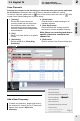
In areas where Electronic Program Guide is applied, you can use this function by clicking
on the button on the Control Panel (See Fig.7 below). Users can view channel lists and
set recordings directly into WinFast PVR2 via the online channel guide.
EPG-Electronic Program Guide
EPG is an on-screen guide for scheduled broadcast television programs, allowing users to
navigate and select content by time, channel, etc.
2
3
1
Fig.7
4 4
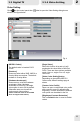
Hot key
Home : Now
: Scroll up/down ( or use
middle key of mouse)
+ - : Zoom In/Out
: Move EPG
Forwards/backwards
Page Up: Previous EPG
Page Down: Next EPG
1
2
3
Fig.6
4 4
13