
User`s manual



WinFast DTV Dongle BDA Driver
WinFast PVR2 Software Manual
2
TV MODE
Digital Video Capture Setting
Click on the control panel, then label to open the Digital Video Capture Setting
dialog box as shown in the figure below.
[Device]
By default the device used is WinFast
DTV1000 T. Or users can select other
available Leadtek devices.
[Image Format]
The formats available are: JPEG, BITMAP,
PNG, and TIFF.
[Transport Stream Type]
Two Transport Stream Types are available:
Capture all packets & Capture this program
only.
[Number of Images/Time Interval (ms)]
Select the number of images in a specified
time interval in ms.
2-2 Digital TV
2-2-3 Video Capture Setting
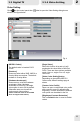
2-2-4 Change the Folder for Saved Media Files
[WorkArea Folder]
To change the folder for the saved media files, please click on the "Browse" button to
browse the directory for saving the recorded media files. All recorded media files will be
saved in the directory.
[Capture Format]
Two types are available: Program Stream
(*mpg) and Transport Stream (*.ts).
When Program Stream is selected, by
default the transport stream type is set to
"Capture this program only ". Otherwise
when Transport Stream is selected, by
default the transport stream type is set to
"Capture all packets".
Note: In order to play Transport
Stream files, use either a VLC media
player (refer to www.videolan.org/vlc/),
or a moonlight-Elecard MPEG player
(refer to www.moonlight.co.il).
Change the Folder for Saved Media Files
10
Fig. 3