
User`s manual




WinFast PVR2 Software Manual
2
TV MODE
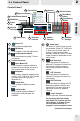
2-1 Control Panel
DirectBurn to Disc button
Click to record programs directly
onto VCD/DVD. Right-click on the
button will show a Capture file
popup menu.
Volume Controls:
Click to turn the volume up/down.
The scroll bar indicates the status
of volume controls.
Mute button
Click to mute the audio. Click again
to resume system sound.
Software Settings
Configuration
Click to open the setup dialog box.
Schedule
Click to preset the recording
schedules.
EPG page button
Click to switch to the EPG mode.
TimeShifting button
Click to run TimeShifting.
Record button
The ring surrounding the Record
button turns orange when recording
is in progress. Right-click on the
button will show a Capture File
popup menu.
9
8
9
8
12
Channel Controls
Click to switch the channel
up/down.
Control Panel 2
Volume Up/Down
Turn the button right to increase
the volume. To decrease the
volume, turn the button towards
the left.
Channel Up/Down
Turn the button right to increase
the channel number. To decrease
the channel number, turn the
button towards the left.
Refer to page 7 for detailed
descriptions on other functions.
1
2
1
2
14
Channel List
Move the mouse
cursor to the space
above the signal area
to display the
available channel list.
Control Panel 3
1
2
Record button
The ring surrounding the Record
button turns orange when recording
is in progress. Right-click on the
button will show a Capture File
popup menu.
TimeShifting button
Click to run TimeShifting.
Refer to page 7 for detailed
descriptions on other functions.
10
11
5 7
13
Signal Indicator
On the indicator, the more lights
are on, the more stronger the
signal is. If you are receiving weak
signal, please adjust your antenna
to receive better signal.
1
2
8