
Operation Manual





6
Open the screen when it is closed.
If the screen is closed, short press POWER key to open the screen. The screen will
be locked, slide the unlock icon to unlock the screen.
3.4 Usage of Touch Screen
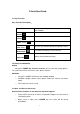
Device operating methods
There are below methods to view the main screen, menu and application procedure in
your device.
Click
When you want to use the screen keyboard typing or choose application in the main
interface, you only need to touch it by your finger.
Press on
If you want to open some item( textbox or the link in the webpage), or shortcut and
main procedure move, you can press on this item.
Quickly slide or slide
Quickly slide or slide indicates make quick vertical or horizontal movement by finger
Pull
Before you pull, you need to hold it with strength until you pull it into the position you
want.
Rotate
For most pictures, you only need to rotate the device sidewise to change the screen
direction from horizontal to vertical. For instance, when you are typing words and
watching movies
View notification
Click the right bottom of device , drag it and view notification
View system basic information
Click the right top of device, drag it and view notification
3.5 Homepage
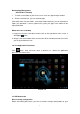
The extended home page
The home page can be extended beyond the wideness of screen to provide
more space, which you can put new-added shortcuts and widgets. Click the
blank space in home page then slide right or left to extend to the right or left of
the screen.