
Operation Manual





5
3 Quick Start Guide
3.1 Keys Function
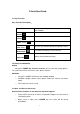
Keys Function Description:
Power button
Short press to sleep/wake up, long press to startup
and shutdown.
Volume
increase the volume
Volume
decrease the volume
HOME(home)
Click it in any interface will return to main interface.
Back(back)
Click it in any interface will return to previous menu
Menu button
This button will display in menu interface.
display recently-used
application
display recently browsed history
3.2 Startup and Shutdown
Startup
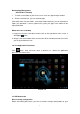
Long press POWER key for three seconds, you can enter into startup picture.
The system enters into screen lock status, please unlock it.
Shutdown
1. Long press POWER, it will enter into shutdown window.
2. Shutdown window contains three options Power off, Restart and Silent
mode..
3. Click Power off is the last step.
3.3 Open and Close of the Screen
Screen will be closed on its own when no operation happens.
1. Screen will be closed on its own if no operation happens for some time to
save battery power
2. When screen is open, press POWER key, the screen will be closed
immediately.