
Operation Manual



Flair E1 User Manual LAVA
-10-
2
2
.
.
2
2
D
D
e
e
s
s
c
c
r
r
i
i
p
p
t
t
i
i
o
o
n
n
I
I
c
c
o
o
n
n
s
s
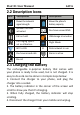
Icons Descriptions Icons Descriptions
Shows the network
signal strength
Shows the phone’s
battery capacity
Speaker has been
activated
You have unread SMS
Call on hold
USB storage is turned on
The ringing type is
set on Vibration
Flight Mode
Wi fi is ON E Data network in use
You have missed calls Alarm is active
On call
2
2
.
.
3
3
C
C
h
h
a
a
r
r
g
g
i
i
n
n
g
g
t
t
h
h
e
e
b
b
a
a
t
t
t
t
e
e
r
r
y
y
The rechargeable Li-polymer battery that comes with
your phone is ready to be used, but is not charged. It is
easy to do so & can be done in 4 simple steps below:
1. Connect the charger to your phone, and plug the
charger into a socket.
2. The battery indicator in the corner of the screen will
scroll to show you that it’s charging.
3. When fully charged, the battery indicator will stop
scrolling.
4. Disconnect the charger from your mobile and unplug.