DVD-PT-10B USER MANUAL Laser 10” Screen Portable DVD Player 2.0 CHANNEL DIGITAL ‘ m.
DVD-PT-10B USER MANUAL TABLE OF CONTENTS IMPORTANT SAFETY INSTRUCTIONS AND PRECAUTIONS a4 CARE OF 5 WHAT’S IN THE BOX THE PLAYER .. INSTALLATION . Indoor Use YOO 7 PLAYBACK 8 The RESOLE COLONEL 8 K@Y FUNCTIONS 9 Loading and Playing a Disc. Display. Angle Subtitle Audio... Zoom A-B Repeat.. ALL 12 Playback MP3/MPEG-4 13 Playback Of DIV 13 Play USB and SD/MMC 14 SYSTEM SETUP General Setup Page TV Display ANNIE MK 14 OSD LANDLUBBER.
DVD-PT-10B USER MANUAL IMPORTANT SAFETY INSTRUCTIONS AND PRECAUTIONS — Read all instructions carefully before use. — Retain manuals for future reference. — Use this product only in the manner described. — Only use a water-dampened soft-cloth to clean the surface of this product. — Use electronic devices in well ventilated areas & not exposed to excess vibration. — The following will damage this product: any liquid such as water or moisture, extreme heat, cold, humidity, dusty or sandy environments.
DVD-PT-10B USER MANUAL CARE OF DISCS CAUTION CLASS LASER PRODUCT A A Laser product symbol: located on the rear panel of the unit indicates that this player is a class 1 laser product; it uses only weak laser and no hazardous radiation outside of the unit.
DVD-PT-10B USER MANUAL WHAT’S IN THE BOX 1X Main DVD player with 10" 16:9 LCD display 1 X Remote control {with battery} 1 X 12VDC (car) Power supply 1 X 110-240VAC mains power adapter 1 XAV Cable 1x Earphones Please check the contents of the packaging carefully.
DVD-PT-10B USER MANUAL INSTALLATION Locate a spare mains outlet and turn it OFF. Plug the supplied AC adapter in to the outlet. Connect the other end to the 12VCD input socket. Turn the main outlet ON. bios won R Turn the main Power Switch on the Player to the ON position. 1. With the vehicle ignition off, connect the supplied DC adapter to the vehicle power outlet. 2. Connect the other end to the DC power input on the side of the DVD player. 3.
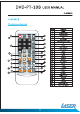
DVD-PT-10B USER MANUAL PLAYBACK tem Function / N\ 1 Power POWER FRIVOLOUS DISPLAY MUTE 2 DVD/SD/UsB @ @ 3 Number Pad DVD Setup 6 Up/Down/Left/Right Audio L @ 9 Fast Rewind 10 Fast Forward (9 11 Mode Angle Mute = —@ 14 Display @— —@ 15 Repeat @— 16 A-B repeat 4@ 17 Search @ 18 Stop .
DVD-PT-10B USER MANUAL PLAYBACK Button Action Power Switches the player ON or OFF DVD/SD/USE Press to cycle between DVD (Optical Disc}, Card reader or USB drive. Use Up/Down/Left/Right button to navigate and the OK button select. Setup Enter or Exit the setup menu. Number Pad Use to enter an item in a menu or to enter a password. OK (Confirm) Press to select an option or validate a setting. A-B Repeat Used to select a portion of Video/Audio to repeat. Previous Press to skip to the previous chapter or track.
DVD-PT-10B USER MANUAL PLAYBACK S. Play/Pause. Press the Play/Pause (M) button on the remote during play to pause playback. To resume, Press the Play/Pause (M) button once again. 6. Fast Forward/Fast Reverse Press Fast Forward or Fast Reverse to achieve the place you desired with speed adjustable during 2X, 4X, 8X, 16X, 32X times. 7. Menu A DVD is divided into sections called titles and chapters. When you play a DVD, a root menu of the disc will appear on the screen of your DVD player.
DVD-PT-10B USER MANUAL PLAYBACK During playback of a disc, press the “ANGLE” button to display the available angles for discs containing multi-angles, with the 1 /3 current angle number and the total number of angles displaying. Press “ANGLE” to select another angle, then press again to exit and return to the normal viewing angle. The angle display will disappear automatically if the “ANGLE” button is not pressed again within 3 seconds. Note: Not all discs contain this feature.
DVD-PT-10B USER MANUAL PLAYBACK During playback press “ZOOM” to enlarge the picture with the current zoom multiple 2X A. During playback press a first time “A-B” to set the Starting Point A. B. Press “A-B” a second time to set the Ending Point B and player will repeatedly play the part between Point A and Point B. €. Press “A-B” a third time to cancel “A-B” repeat and resume normal playback.
PLAYBACK When a MP3/MPEG-4 disc is inserted into the unit, the menu screen appears automatically. You can use the menu screen to select your desired folders and songs or the system plays the songs in the order they were burned onto the disc. 1. Press the A or ¥ button to choose a folder from the folder list. 2. Press “OK” to select the highlighted folder. The songs available under the folder will be listed. 3. Use A or ¥ button to choose a song from the list.
DVD-PT-10B USER MANUAL SYSTEM SETUP WP Note. Plug in the USB device noting correct orientation. Press [DVD/SD/USB], then choose USB to select the content. Insert a memory card to the SD/MMC slot. Press [DVD/SD/USB] and select SD to play memory card. Press “SETUP” on the remote to bring up the SYSTEM SETUP MENU. Press the « or p buttons return to the required settings page. When the required page is shown press the “OK” button to enter the page.
DVD-PT-10B USER MANUAL SYSTEM SETUP You can choose one out of several different languages as the OSD setup language « ON: Captions are displayed. (If an captions available). ® OFF: The screen will not display captions. * ON: Enables screen saver. » OFF: Disables screen saver (off}. Note: The DVD player will enter the Screen Saver mode after approximately five minutes if the same image remains on the screen. » ON: The unit will return to the last position on the disc.
DVD-PT-10B USER MANUAL SYSTEM SETUP » R-Mono: Playback of Right channel audio only. * Mix Mono: Both Left/Right channels are mixed to one mono channel. Use this mode to level all sound channels to ensure even sound levels. 1. Press The OK Button to enter. 2. Use the A or V¥ buttons to adjust the dynamic range as required. 3. Press the OK Button aging to confirm the adjustment. Adjust the image quality. 1. Use the A or ¥ buttons to select the option to change and the press the “OK” button. 2.
DVD-PT-10B USER MANUAL SYSTEM SETUP Sets the default Language of the Subtitles of DVDs played on this play. Sets the default Language of the DVD Menu of DVDs played on this play. NOTE: Audio, Subtitle and Disc Menu settings are subject the availability of your selection on the DVD. Select the parental level you desire for disc with lock-out function or multiple rating levels. There are listed from the level (1 Kid Safe) to the highest level (8 Adult).
DVD-PT-10B USER MANUAL TROUBLESHOOTING Problem Possible Solution No sound or distorted 1. Make sure your DVD is connected properly. Make sure all sound? cables are securely inserted into the appropriate jacks. 2. Make sure the Audio is not muted. No Power Ensure that power connection is firmly seated in plug and there is power to the power supply.
DVD-PT-10B USER MANUAL TROUBLESHOOTING NE Open the Battery Door. ~ Insert one CR2025 size battery. use the remote control, point it at the remote sensor on the player. s @ In the first instance the player should be left on charge for 12 hours. Regular charging can be completed in 5 hours. Connect the player to the AC charger or DC charger. The player will charge when connected. Although the player will charge during playback, the player can be turned off to decrease charging times.
DVD-PT-10B USER MANUAL Warranty Against Defects Laser Corporation Pty Ltd {“Laser”) warrants your new product to be free from defects in materials and workmanship for 12 months, from the date of purchase, provided that the product is used in accordance with accompanying recommendations or instructions where provided.