
Specifications





Page | 11 516041-1118
Error
Associated VIALMIX®RFID Response
Likely Cause of
Message
Action Required by User
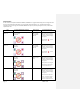
Interrupted Cycle –
STOP button
pushed
Interrupted Cycle error message on main
screen (IC) Audible alert
User pushed STOP
button mid-
cycle, creates
partially activated
vial.
Do not use the DEFINITY®
vial. Vial was not acceptably
activated.
The error will clear once the
cover is opened, a new
DEFINITY® vial is placed in the
carrier, and the cover is
closed.
Interrupted Cycle –
Cover opened
Interrupted Cycle error message on main
screen (IC) with cover open icon
Audible alert
User lifted cover
mid-cycle, creates
partially activated
vial.
Do not use the DEFINITY®
vial. Vial was not acceptably
activated.
Press the STOP button to
clear the error
Place a new DEFINITY® vial in
the carrier and initiate
activation cycle by pressing
the START button.
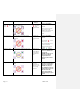
Usage Count Alert
Usage Count Alert message on main screen
(>95%)
VIALMIX®RFID has
exceeded 95% but
less than 100% of
the programmed
limit of activation
cycles.
Contact Customer Service
immediately for a
replacement VIALMIX®RFID
(see page 15).
VIALMIX®RFID will cease to
operate once 100% of
programmed limit of
activation cycles has been
reached.
Usage Count Error
Usage Count error message on main screen
(100%)
VIALMIX®RFID has
reached the
programmed limit
of activation cycles
and is no longer
operational.
VIALMIX®RFID is no longer
operational. Call Customer
Service for a replacement
VIALMIX®RFID (see page
15). VIALMIX®RFID must be
properly disposed of at the
end of its service life.
Please contact Lantheus
Medical Imaging for proper
disposal.