
User's Manual





78
Note: This copying mode requires the optional reversing automatic document feeder and automatic
duplexer to be installed.
1
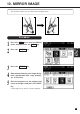
Press the 1→1 key on the Basic menu.
Press the 2→1 key.
2
3
Single-sided Copies from Two-sided Originals
CopyCopyOriginal
3
5
Select the desired copy size, image density
level copy quantity, etc. if necessary.
● The automatic paper selection mode is
selected as the default mode.
Place the originals.
● See page 22 for how to set the originals.
4
Press the START key.
● Single-sided copies are output from the
copier.
7. DUPLEX COPYING (Cont.)