
User's Manual



52
1. MONOCOLOR COPYING
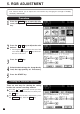
You can select one color out of 10 colors of the color sample seal to make a monocolor copy.
1
Procedure
2
3
Press the START key.
4
Press the COLOR key to enter the color
menu, then press the MONOCOLOR key.
Press the desired copy color key.
● Press the MAGENTA key for instance.
Select the desired copy size, image density
level, copy quantity, etc. if necessary.
Note: Refer to the color sample seal.